
How to Increase Reach on Instagram

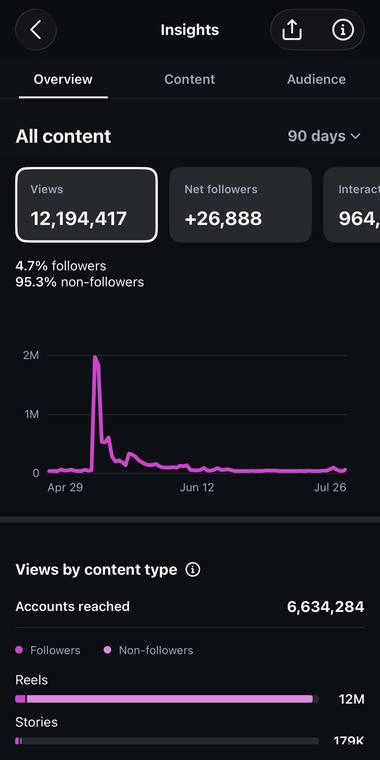
Here's how to increase reach on Instagram: get more of your reels in front of people who don't follow you yet. Reach counts the different accounts that see your content, and your followers are only a small slice of it. Over my best 90 days, accounts that didn't follow me made up 95.3% of my views.
- What reach means: the number of unique accounts that saw your content on screen at least once. On a single reel, Instagram labels it viewers.
- Reach vs views: one person can rack up several views, but counts only once toward reach.
- Where it comes from: mostly non-followers. Instagram tries a new reel on a small group of them, then widens it in steps.
- What grows it: a strong first 3 seconds, reels a stranger understands and wants to send, and original work.
- What shrinks it: watermarks, reposts, engagement bait, reels over 3 minutes, and posts that break Instagram's recommendation rules.
What does reach mean on Instagram?
Reach is how many different accounts saw your content at least once. If one person watches your reel five times, you get five views but only one account reached. Depending on the screen, Instagram labels it accounts reached or viewers, and it marks the number as an estimate.
There are two kinds people mix up. Post reach is the count for one post. Account reach covers everything you shared in the date range you pick, so someone who saw three of your reels still counts once.
| Number | What it counts | My 90 days |
|---|---|---|
| Views | Every play of a reel, and every time a photo or story shows on screen, repeats included | 12,194,417 |
| Accounts reached | Different accounts that saw any of it at least once | 6,634,284 |
| Interactions | Likes, comments, shares and saves | 964,617 |
| Net new followers | New follows minus unfollows | +26,888 |
Why the gap between the first two rows? Replays, plus people who caught more than one of my reels. That's normal. It's also why reach is the number to watch when you want to grow, because every new account reached is a new person who might follow you. If you want the view side in detail, I explain how a play counts in Instagram Reels views.
Sources: Instagram Help Centre pages on reel insights and on Commerce Manager insights, for reach and reach from non-followers; Facebook for Creators on the switch to views (November 14, 2024); the Media Insights reference from Meta, for interactions. Read November 3, 2026. My numbers: my own Insights screenshots, April 28 to July 27, 2026.
How do you see reach from non-followers in Insights?
Instagram's creator blog says you can split accounts reached into followers and non-followers, then change the date range to watch it over time. On instagram.com it sits under Dashboard, then Insights. In the app, look inside your professional dashboard. You can pick any range within the last 90 days. Menu names move around, so look for the line that splits followers from non-followers.
Here's mine, straight from my phone:
Views
Interactions
That split is mine, from a stretch when I was testing a lot of reels on strangers. It isn't typical. An account that mostly posts to its own followers will see a much bigger follower share, and that's fine. It just tells you where your growth can come from.
Sources: "Tips for improving your reach" (Instagram for Creators, 2023) and the Help Centre page on account and content insights, read November 3, 2026. Screenshot: my own Insights.
Why non-follower reach is the lever
Instagram explained this in a creator post in February 2025. When you post a reel, it's shown to followers and to non-followers. On the non-follower side, it starts with a small audience Instagram thinks will enjoy it. If those people respond, the strongest reels move on to a slightly bigger group, and the strongest of those keep going.
Wave 1A small group of non-followers who seem likely to enjoy it
Wave 2A slightly wider group
Wave 3 and onWider groups again, and so on
Meta says the point is to spread content based on engagement, not just on how many followers you have. It also says it expects creators who post recommendation-friendly content, like reels, to get more of their reach from non-followers over time.
My own account shows the same thing from another angle. Only 54 of my 243 reels are on my profile. The rest, 189 reels, never went to my profile, and that group pulled 83% of my reel views. Strangers found them anyway.
Source: Instagram's creator post on ranking and recommending reels (February 26, 2025), read November 3, 2026. Which reels sit on my profile: checked by me that day.
Most of my reach comes from people who don't follow me. My free video shows how I set that up.
Watch the videoHow to increase reach on Instagram, step by step
Every step below is backed by something Instagram itself has published.
- Win the first 3 seconds. Instagram's creator FAQ tells you to make them engaging so people don't move on, and its 2025 post says to open with a compelling hook.
- Make each reel clear to someone new. If your goal is new people, Instagram says the reel should make sense to people who may not know you.
- Make it worth sending. On Reels, Instagram's top predictions include how likely you are to reshare a reel and how likely you are to finish it. Meta says people reshare reels over 4.5 billion times a day across Instagram and Facebook.
- Post your own work. Instagram is less likely to recommend a repost of an existing reel, and its FAQ says a third-party watermark may hurt reach.
- Stay under 3 minutes. Instagram's FAQ says only videos of 3 minutes or under get recommended to unconnected audiences.
- Add sound. Meta says audio helps a reel grab attention with new audiences, and photos or carousels with audio may show up in the Reels tab too.
- Use the words people search for. Put clear keywords in your caption and bio, so people can find you through Instagram search.
- Talk back early. Reply to comments in the first week. Instagram's FAQ says that can help a reel get more reach.
- Team up. A Collab post goes to the followers of both accounts, and Instagram says those posts can be recommended in Reels, Explore and Feed.
- Look at Account Status. When an account isn't eligible to be recommended, Instagram says none of its content gets recommended.
Sources: Instagram's creator FAQ; its creator posts of May 31, 2023, January 21, 2025 and February 26, 2025; Adam Mosseri, "Instagram Ranking Explained" (About Instagram, 2023); the Help Centre page on recommendation eligibility. Read November 3, 2026.
What hurts your reach?
- Another app's watermark on the video.
- Reposting a reel that's already on Instagram, or building your account on other people's clips.
- Clickbait, engagement bait, contests and giveaways, which Instagram lists as content it may not recommend.
- Reels longer than 3 minutes, which won't be suggested to people who don't follow you.
- Low resolution, muted sound, borders or a screen that's mostly text. Instagram's ranking explainer names all four as things it makes less visible.
- Posts that break the Recommendation Guidelines. They can still reach your followers in Feed and Stories, but Instagram tries not to recommend them to anyone else.
If your reach falls to almost nothing and you think something bigger is going on, read my guide to the Instagram shadowban before you change everything.
Sources: Instagram's creator FAQ and its 2023 reach tips; Mosseri's 2023 ranking explainer. Read November 3, 2026.
How I test reach with Trial Reels
A Trial Reel is the cleanest reach test I know. Non-followers get it before anyone else. It stays out of your followers' Feed and Reels tab unless you share it with everyone, though one of them can still bump into it, for example if a friend sends it in a message. About 24 hours later, you can see how it did.
When a trial does well, you choose what happens next. You can share it with everyone yourself. Or you can turn on automatic sharing, and Instagram shares it for you when it gets a lot of views in its first 72 hours. Instagram also ranks trial reels apart from your regular reels, so a weak one shouldn't drag the others down. You need a professional account to use them. My Trial Reels guide walks through the setup.
Reach is only half the job, though. Turning those strangers into followers is the next step, and I cover it in how to get followers on Instagram. If you'd rather have all of this as a plan with weekly checkpoints, start with my Instagram growth strategy.
Sources: "About trial reels on Instagram" (Help Centre) and Instagram's trial reels launch post (December 10, 2024), read November 3, 2026.
Questions people ask
What does account reach mean on Instagram?
It's the number of different accounts that saw your content at least once in the date range you picked. One person who saw five of your posts counts once.
What's the difference between reach and views?
Views count every play or showing, repeats included. Reach counts each account once. In my best 90 days I had 12,194,417 views and reached 6,634,284 accounts.
How do I reach non-followers on Instagram?
Post reels, because Instagram recommends them to people who don't follow you, and make each one clear to a stranger in the first 3 seconds. Trial Reels let you test a reel on non-followers before your followers see it.
Why did my Instagram reach drop?
Check Account Status first. Then look for watermarks, reposted clips or reels over 3 minutes. Some drops are normal swings, and Instagram itself says recommendations make reach harder to predict.
Do hashtags still help your reach?
A little. Instagram's FAQ says relevant hashtags can help you reach people interested in those topics, and that irrelevant ones can hurt. They matter far less than your first line.
Sources: Instagram's Help Centre and creator FAQ (read November 3, 2026). Numbers: my Insights, the 90 days to July 27, 2026.
Reach starts with strangers. My free 10-minute video shows the exact way I test reels on non-followers, and what I do with the ones that travel.
See where views come from: Instagram Reels views.